TỘC TỐI CỔ · ANDROID REJOIN TOOL

Keep your game online.
Peace of mind, anytime.

Manage Android game tabs, reconnect automatically and monitor activity — all in one lightweight tool.

  • Automatically rejoin when the game disconnects
  • Automatically join the configured Place ID
  • One phone: Free 2 tabs · VIP 4 tabs
  • Permanent Free key, one device at a time

One key · One device · Manage it yourself

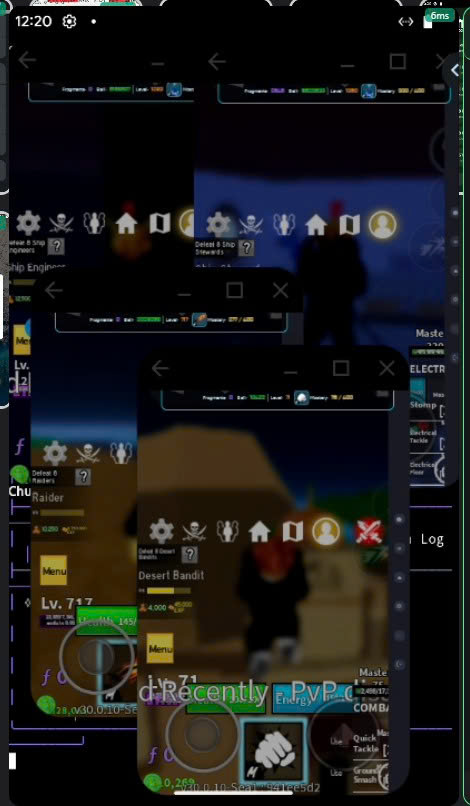
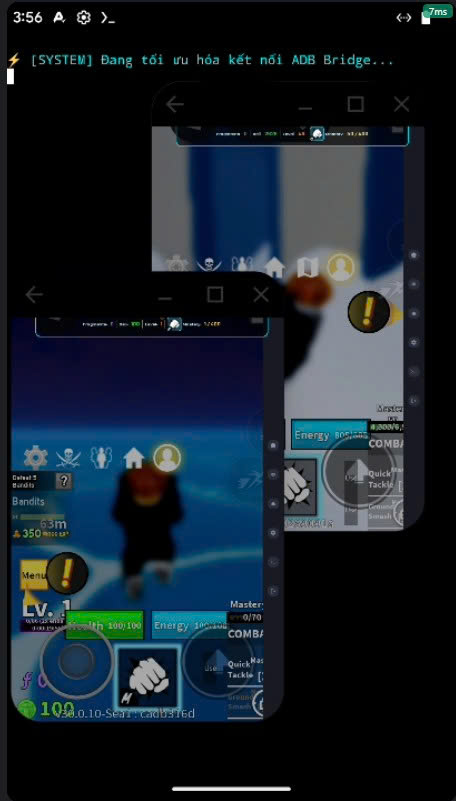
FREE VERSION2 tabson one phone
Tool image FREE VERSION, 2 tabs on one phoneEnlarge image →
VIP VERSION4 tabson one phone
Tool image VIP VERSION, 4 tabs on one phoneEnlarge image →
Free: 2 tabs · VIP: 4 tabsOn the same phone
Automatic rejoinMonitor game processes
Take control of securityDevice-bound keys with reset allowance management
Manage keys on the websitePurchase, renew and change device
QUICK SETUP

Set up in a few steps

Prepare Termux and root access, then paste the installation command.

01

Prepare your device

Rooted Android - 845 Genplay device

Install Termux (if needed) - grant Termux root access through the genmanager01 app

02

Open Termux and run the command

Copy the command below, paste it into ordinary Termux and press Enter. The tool automatically installs the required environment and starts.

● ● ●Termux
curl -fsSL https://toctoico.com/download/start_toctoico.sh -o ~/toctoico.sh && bash ~/toctoico.sh
Download installer ↓
03

Enter your key and start

Choose [4] to paste a Free or VIP key. The tool detects the key and activates the correct version automatically.

● ● ●TỘC TỐI CỔ

Actual tool interface example (Vietnamese; the CLI has not been localized)

Join cộng đồng Discord lấy key Free vĩnh viễn

[1] Khởi động treo auto
[2] Quản lý danh sách Tab
[3] Thiết lập Place ID & LinkCode
[4] Dán key Free & VIP
[6] Thoát chương trình
Next time, open Termux and type toctoico to reopen the tool.

An internet connection is required to authenticate your key.

To update: run the installation command in step 02 again. The toctoico command opens the version currently installed on your device.

START FREE

Join Discord and get a permanent Free key

Open the key channel → use /keyfree → receive your private key → open the tool and enter it. The first device to authenticate is linked to the key; the key is saved for automatic authentication on reopening.

Each Discord account has one permanent Free key. Reuse /keyfree always retrieves the same key by DM; if DMs are blocked, the bot replies privately within Discord.

A key works on only one device at a time. To transfer devices: fully exit the tool on the old device (menu [6]) and do not reopen it → use /resetkey in Discord → enter the same key on the new device. Resets must be at least 3 days apart; the key and permanent validity are preserved.

Join Discord ↗
PRICING

Choose your plan

VIP validity starts at first activation.

VIP 7 ngày

$2

For 7 days of use

  • Automatic rejoin & manage tabs
  • Join the configured Place ID
  • Up to 4 tabs per device
  • VIP optimization according to supported settings
  • 4 device-transfer resetsRenewing this plan adds 4 resets. Unused resets accumulate; resetting preserves the key's validity period.
  • Discord support
Sign in to buy →

VIP 90 ngày

$16

For 90 days of use

  • Automatic rejoin & manage tabs
  • Join the configured Place ID
  • Up to 4 tabs per device
  • VIP optimization according to supported settings
  • 50 device-transfer resetsRenewing this plan adds 50 resets. Unused resets accumulate; resetting preserves the key's validity period.
  • Discord support
Sign in to buy →

VIP Vĩnh Viễn

$46

For 3650 days of use

  • Automatic rejoin & manage tabs
  • Join the configured Place ID
  • Up to 4 tabs per device
  • VIP optimization according to supported settings
  • 1000 device-transfer resetsRenewing this plan adds 1000 resets. Unused resets accumulate; resetting preserves the key's validity period.
  • Discord support
Sign in to buy →

Rejoin Key History

Sign in to view purchased keys, renew and manage devices.

Sign in to view keys

Confirm key purchase

Funds will be deducted from your VND wallet. Validity starts when the key is first activated.

Reset device binding

Your key

Keep your key private. One key is used on one device.

Tool image